Aiython
When Python doesn’t know what to do, Aiython does.
Aiython runs Python normally and brings in AI when Python cannot parse the source or continue execution. AI works with the live program state; Python keeps control of execution.
from typing import Literal

tickets = [
    "After uploading a PDF, the ticket page freezes until I refresh the browser.",
    "Could you email last month's invoice and update the billing contact for our team?",
]
queues = {"bug": [], "billing": []}

for ticket in tickets:
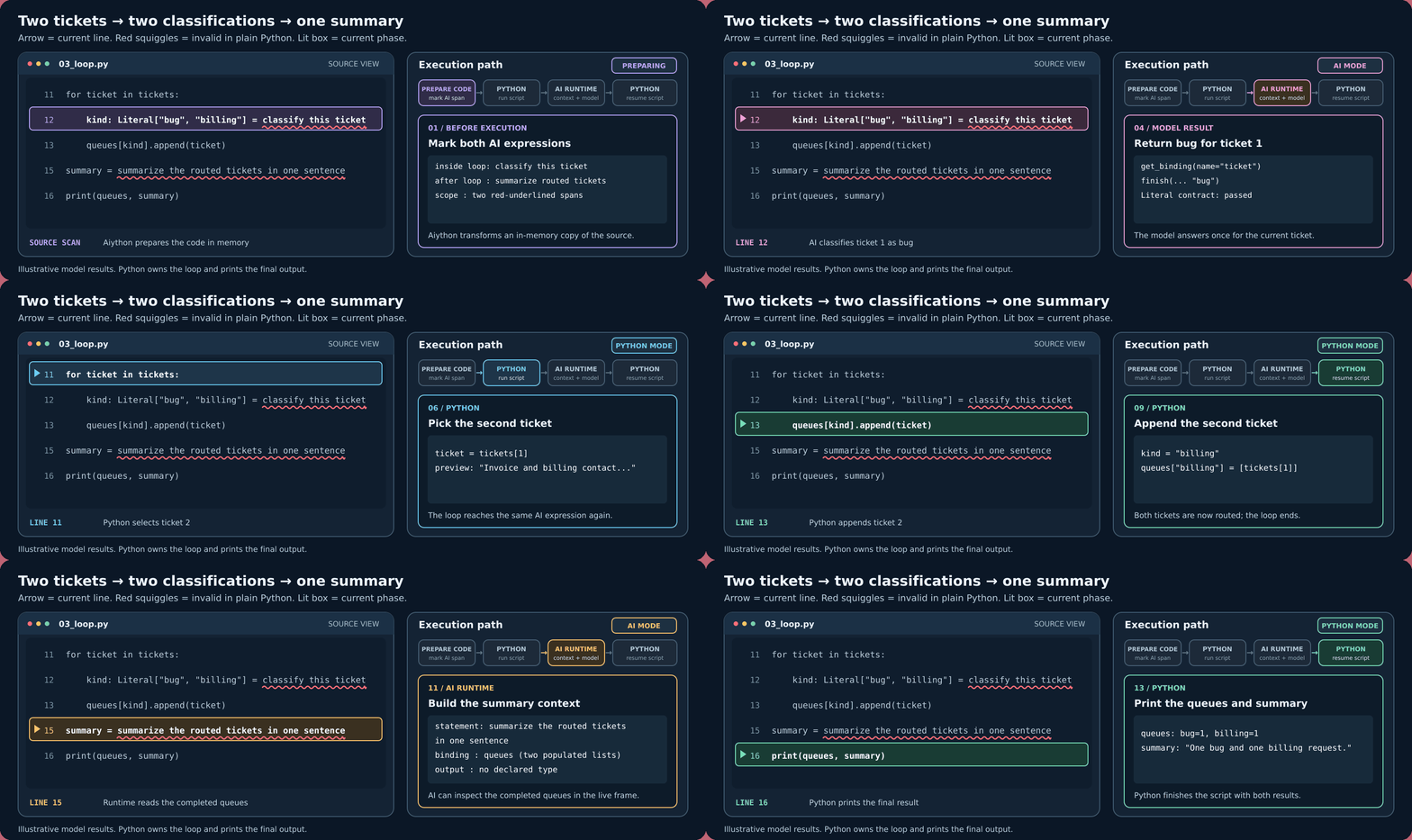
    kind: Literal["bug", "billing"] = classify this ticket
    queues[kind].append(ticket)

summary = summarize the routed tickets in one sentence
print(queues, summary)
The two natural-language statements are invalid in plain Python. Aiython handles each one when execution reaches it: two classifications inside the loop, then one summary after the loop. Try the complete loop example or inspect the AI boundary with aiython --explain PATH before running it.
Explore the documentation
- Get started: install Aiython, configure a model, and run your first script.
- Examples: small programs for typed results, state changes, recovery, and capabilities.
- Runtime and type safety: understand what Python executes and what Aiython checks.
- Configuration and capabilities: choose providers and add only the routes your programs need.
Run trusted code
Aiython is not a sandbox. Frame tools can use eval and exec with your process permissions, and relevant source or object data may be sent to your configured provider. Model output, cost, and latency depend on that provider.